The Software Was the Easy Part
What We Learned Digitizing a Small Manufacturing Business
At first, the project looked simple.
A small manufacturing business wanted to replace paper time sheets with a digital system. Employees would record their time more reliably. Managers would spend less time preparing payroll. The business would have cleaner information than handwritten sheets, manual calculations, and end-of-week corrections.
That was the visible project.
The real project was different.
Once the system reached the shop floor, the valuable lessons were not mainly technical. They were operational. What initially looked like a paper-replacement project revealed how time was actually being recorded, how people had adapted to old processes, how managers interpreted new numbers, and how small physical details affected adoption.
The first application did not deliver its biggest value by being a better time sheet. Its biggest value was that it started creating reliable operational records.
Those records became the foundation for everything else: better visibility, better business rules, better cost analysis, and a path toward more complete operational systems.
For many SMBs, that is the lesson. The first digitization project is rarely the final destination. It is the moment when the business starts seeing itself more clearly, often in ways nobody fully expected at the beginning.
Key Takeaways
- Paper often records habits more than operational reality.
- Better data requires interpretation, not just technology.
- Adoption depends on fitting the real work environment.
- Business rules should evolve with the operation.
- Reliable operational records become the foundation for future systems.
Lesson 1: Paper does not record reality; it records habits
Paper time sheets can look precise. A page may show clean start times, end times, totals, signatures, and weekly summaries.
But paper often records habits as much as reality.
Employees write down the time they normally start, the time they remember starting, or the time that has become accepted in the old process. Numbers are rounded. Small differences are absorbed. Informal routines become invisible because everyone is used to them.
That does not mean people are acting in bad faith. In many workplaces, paper processes evolve around trust, convenience, memory, and pace. If the process has worked for years, people naturally follow the pattern they know.
Digital capture changes that pattern. It does not only speed up administration; it changes what the business can observe.
When employees clock in through a shared station, badge, scanner, or tablet, the event is recorded closer to when it actually happens. The system can show that someone who usually wrote 6:00 started at 6:08, or that a shift pattern varies more than the paper records suggested.
That kind of visibility can be uncomfortable at first. It turns a familiar administrative routine into measurable operational data.
The point is not to catch people. The point is to understand what the old process was hiding.
Paper does not only create administrative work. It can also make operational reality soft around the edges. A digital system sharpens those edges, and the business has to be ready for what becomes visible. That is where the next lesson begins: the gap between old and new records needs interpretation, not just correction.
Lesson 2: Discrepancies are not just data problems
When paper records and digital records disagree, it is tempting to treat the situation as a software issue.
Is the clock wrong? Did the tablet fail? Was the badge scanned correctly? Did the rounding rule work?
Those questions matter. The data has to be validated. A new system must prove that it is capturing events correctly, applying rules consistently, and producing reports the business can trust.
But discrepancies are not only data problems. They are also managerial and human problems.
An owner or manager who has relied on paper for years may see the new numbers and wonder whether the system is wrong, whether employees are changing behavior, or whether the old records were less accurate than assumed. That reaction is normal. Better data can challenge the story the business has been using to understand itself.
The implementation has to manage that transition.
It is not enough to say, "the database says this." The manager needs help interpreting the difference between declared time and captured time. The team needs a calm explanation of what the new system measures, how business rules are applied, and why some discrepancies are expected when an old process becomes visible.
Running paper and digital records in parallel for a short validation period can help. It gives the business concrete examples to review. It separates real software issues from old process habits. It also gives managers time to build confidence in the new information before they depend on it fully.
This is where operational software work becomes operational change work.
The system has to be accurate, but the rollout also has to protect trust. If people feel accused or managers feel surprised without context, the project can become political even when the software is working correctly. Looking back, this was one of the clearest reminders that adoption is shaped as much by context as by code.
Lesson 3: Adoption depends on operational context
Many office software assumptions fail on a shop floor.
It may sound simple to say, "everyone can use their phone." In a factory or workshop, that assumption can break quickly.
Workers may not want to use personal smartphones for work. Some may not have them available during the shift. Gloves, dust, noise, movement, shared workstations, and the rhythm of production all change what is practical.
The best interface is not always the most modern-looking one. It is the one that fits the physical environment.
In this type of setting, shared tablets or kiosk stations can work better than asking every worker to install an app. NFC keys, barcode badges, or scanner-friendly flows reduce typing and make the action feel closer to using a time clock than filling out a form.
That matters because adoption is not only about training. It is about friction.
If recording time requires taking out a personal phone, unlocking it, opening an app, typing on a small screen, and navigating a workflow while wearing gloves or moving between stations, the process will feel like an interruption.
If the worker can walk to a nearby tablet, scan a badge, select the relevant project or activity, and continue working, the system fits the day better.
Digital transformation in a small manufacturing business is often won or lost in these details. One surprise was how much the physical layout mattered once the workflow moved from paper to shared devices.
Lesson 4: Small physical details can decide success
One of the simplest adoption improvements was physical placement.
Instead of relying on one central station, multiple tablets were placed around the shop. Workers naturally used the station closest to their work area. That reduced walking, waiting, and lineups at busy moments.
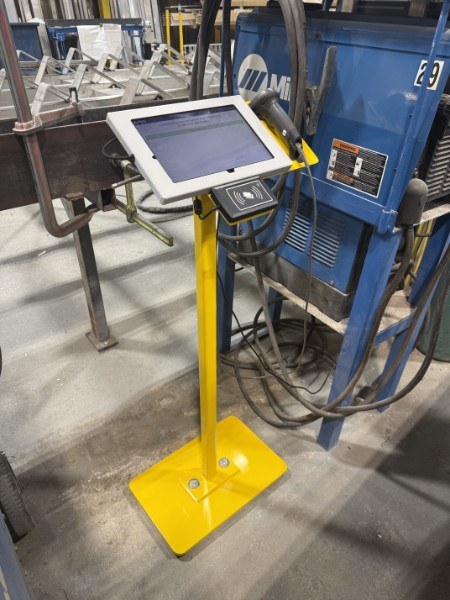
No large change-management program was required for that improvement. The environment did some of the work.
This is an important lesson for SMB projects. Adoption is not always improved by more communication, more documentation, or more training sessions. Sometimes it improves because the system is placed where the work actually happens.
Small physical choices can decide whether a system feels like help or friction:
- Is the tablet close enough?
- Is the screen readable in the environment?
- Can the worker identify quickly with a badge or key?
- Are there enough stations during shift changes?
- Does the flow respect how people move through the shop?
These details may look secondary from a software perspective. Operationally, they are central.
A good system should not ask the business to behave like an office if the work happens in a factory. Once the capture points fit the floor, the information they produced became useful much sooner.
Lesson 5: Real-time visibility changes management
With paper, managers usually learn what happened after the fact.
Someone collects time sheets. Someone enters or reconciles the numbers. Someone prepares a report. By the time the information reaches the owner or operations manager, the work is already done.
That delay becomes normal, but it changes how the business is managed.
If an owner is away from the factory, the only way to know whether things are normal may be to call someone. If a supervisor is busy, those calls become interruptions. If nobody calls, small issues may only appear later in the paperwork.
Digital operational records change that pattern.
Once time events are captured as they happen, managers can see basic operational signals from a phone, tablet, or laptop. They can check whether people are on site, whether shifts started normally, whether activity looks consistent with the plan, and whether something deserves a focused question.
This is not about surveillance. A useful operational dashboard does not need to turn every employee action into a management event. The better question is simpler: does the operation look normal right now?
That visibility can reduce routine status calls. It can make conversations more specific. It can help managers spot issues earlier without constantly interrupting the floor.
The project may have started as time tracking, but the management value came from situational awareness. And once managers can see the operation more clearly, the rules behind the system start to matter more.
Lesson 6: Business rules will change
No operational system should assume the business will stay exactly the same.
In one real-world moment, an unexpected schedule request required a business-rule adjustment. The existing rule made sense when it was created. It reflected normal operating conditions and helped prevent inconsistent entries.
Then reality changed.
The right response was not to bypass the system or force the business back into yesterday's rule. The rule had to be reviewed, adjusted, tested, and deployed.
That was possible because the application logic had been designed around configurable business rules rather than rigid assumptions buried throughout the system.
This distinction matters.
Every business has rules: shifts, breaks, rounding, approvals, exceptions, activity categories, budgets, access rights, and reporting definitions. If those rules are hidden in hard-coded workflows, every operational change becomes slower and riskier.
If rules are explicit, the business can examine them. It can ask why a rule exists, what control it protects, and what has changed in the real operation.
That does not mean rules should be changed casually. Even a simple operational adjustment should be validated before deployment. A change that helps one scenario can create problems somewhere else if it is not tested.
But a system built with adaptable rules gives the business a practical way to evolve. That adaptability becomes even more important when the first workflow begins to connect with the rest of the operation.
From time capture to operational system
Time tracking is often just the starting point.
At the beginning, the goal may be payroll, fewer paper sheets, or less administrative cleanup. Those are valid reasons to start. But once dependable operational information exists, the business can ask better questions.
Which projects consume the most labor?
How much time goes to production compared with support activities?
Where do estimates differ from actual work?
Which activities create recurring overruns?
What information should be visible during the day instead of after the week closes?
Those questions lead naturally into a broader operational system.
The next steps may include work orders, production planning, inventory, purchasing, budgeting, ERP integration, dashboards, KPIs, and eventually AI-assisted operational intelligence.
But the order matters.
Dashboards are only useful if the underlying records are reliable. KPIs are only useful if people agree on what the events mean. AI-assisted analysis is only useful if the system captures operational reality with enough consistency to reason from it.
That is why the first application matters so much. It does not need to solve everything. It needs to create a reliable foundation.
For a small manufacturing business, an incremental path is usually more practical than a large transformation program. Start with one painful workflow. Capture the right data. Validate it with the people who know the operation. Adapt the rules. Build trust. Then expand.
This approach is also safer. The business learns from real use instead of betting everything on a large specification written before the messy details are visible.
The software was the easy part
The screen was not the hard part.
The hard part was understanding the operation well enough to build the right first system. It was seeing the difference between paper habits and operational reality. It was helping managers interpret discrepancies without turning better data into a blame exercise. It was choosing tablets, kiosks, badges, and placement that fit the shop floor. It was designing business rules that could adapt when reality changed.
Most importantly, it was creating dependable operational information.
That is the real value of a first operational software project. Not because it replaces paper with a database, but because it gives the business a more accurate foundation for future decisions.
DEVTom does not look at this kind of work as isolated software. A first application should be useful on its own, but it should also help the business move toward a broader operational system.
Once that foundation exists, the next steps become more realistic: work orders, budgeting, inventory, production planning, dashboards, KPIs, ERP integration, and AI-assisted operational intelligence.
The first application is not the destination. Done well, it is the foundation that makes the next operational system possible.
If this feels familiar
Operational software projects rarely begin with ERP. They usually begin by identifying one manual process that creates unnecessary friction, then building the smallest useful system around the real operation. The objective is not to digitize everything at once; it is to create a reliable operational foundation the business can expand over time.
Related notes: paper versus digital time capture, real-time factory visibility, and business-rule changes.