Modernizing Legacy Systems Without Touching Them
Modernizing Legacy Systems Without Touching Them
(A safer approach to legacy application modernization)
How standalone cloud apps can safely reduce dependency on legacy software
Executive summary
Many SMBs rely on legacy systems they can't afford to rewrite and don't dare to touch. A safer alternative is to build modern, standalone cloud applications next to the existing system — focused on specific workflows — and progressively reduce daily dependence on legacy tools, without deep integration or risky migrations.
This approach is particularly well suited to internal business applications, where rewriting legacy software would be too costly or risky.
Legacy systems don't usually break — they slowly become a risk
In many SMBs, legacy systems are still doing their job.
They might be an old Access database, a custom PHP application, a collection of spreadsheets, or an internal tool built years ago. The system works, but over time:
Every change becomes risky
Maintenance costs keep increasing
Knowledge is concentrated in one or two people
New needs are handled outside the system
The problem isn't the technology itself. It's how much of the business still depends on a legacy internal system every day.
Why rewriting legacy software is rarely the right answer
Traditional legacy system modernization projects often assume:
Deep integration with existing systems
Long timelines
Significant budgets
High operational and delivery risk
For most SMBs, this approach is too expensive and too disruptive. As a result, legacy application replacement is postponed — and technical debt continues to grow.
A safer model: standalone applications, running in parallel
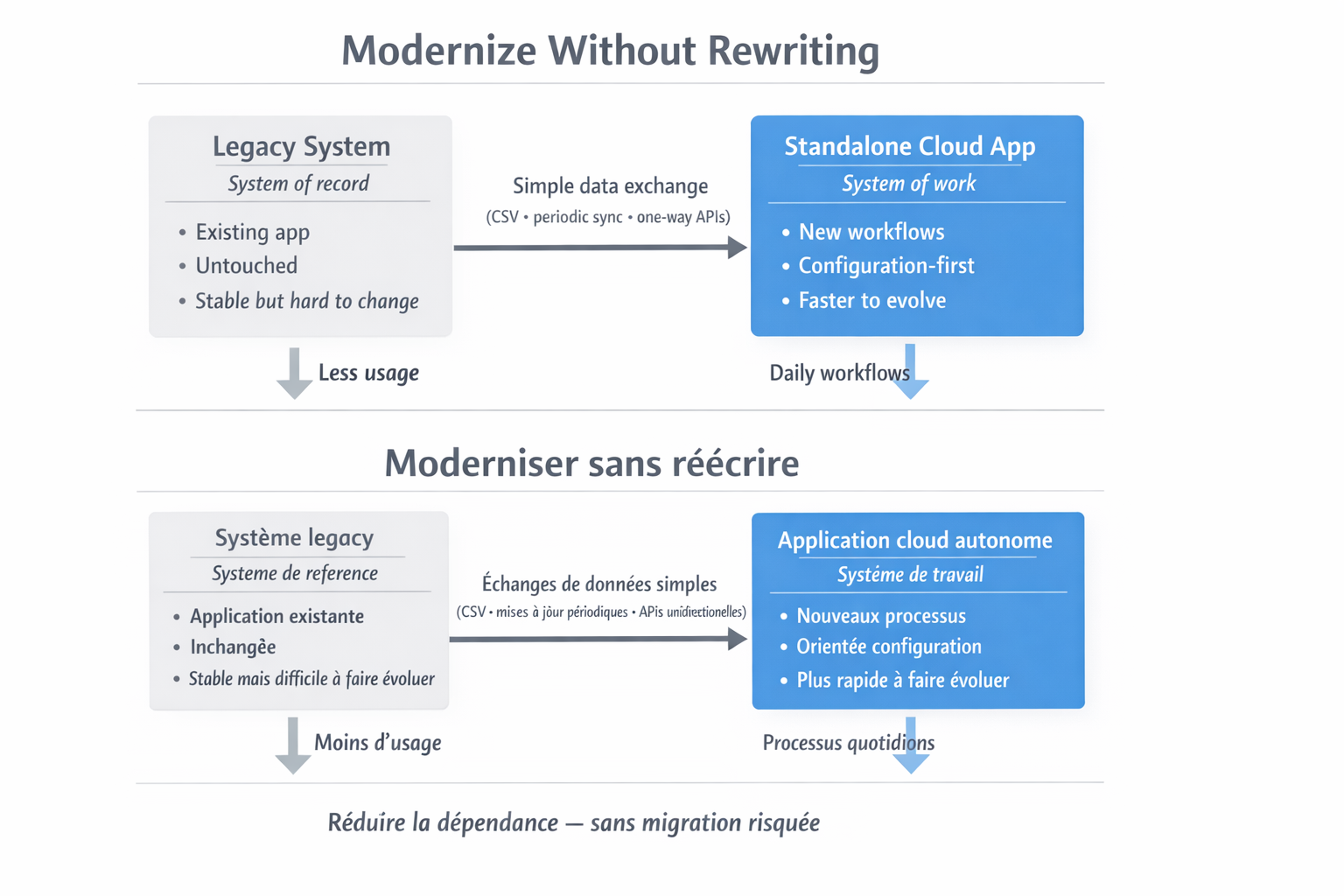
A more pragmatic approach is to leave the legacy system untouched and build new applications alongside it.
In this model:
The legacy system remains the system of record
A new application becomes the system of work
Each application focuses on a single internal workflow (approvals, tracking, reporting, coordination)
There is no attempt to refactor or modernize old code. The goal is simply to move day-to-day work elsewhere.
This is often the safest form of legacy application modernization for SMBs.
Data exchange without fragile integration
These new applications are designed to be autonomous.
They don't require:
Direct access to existing databases
Installation in the customer's environment
Tight, bidirectional integrations
When data needs to move, it's done in simple, controlled ways:
One-time imports (CSV, exports)
Periodic updates
One-way API calls when available
Manual steps at first, automated later if needed
This keeps systems decoupled and reduces long-term maintenance risk.
What changes over time
As teams adopt the new internal tools:
Fewer people log into the legacy system
Critical workflows move out
The old system gradually becomes read-only
Often, this happens without a formal migration project. Dependency is reduced one workflow at a time.
Modernization as risk reduction, not transformation
This approach isn't about chasing technology trends.
It's about:
Reducing operational risk
Lowering the maintenance cost of legacy systems
Making internal software easier to evolve
Giving teams tools that match how they work today
For SMBs, modernizing legacy software is less about transformation — and more about containment and control.
How does this compare, cost-wise?
If you're trying to budget this kind of project, the hardest part is comparing approaches.
I built a lightweight estimator to contrast the total cost of building a custom internal web application using a traditional development stack versus using a modern application platform that emphasizes configuration over custom code.
The goal is to sanity-check effort and tradeoffs — not to produce an exact price.
Modernization doesn't have to start with a rewrite. Sometimes, the safest move is to build next to what already exists.
If this feels familiar
Operational software projects rarely begin with ERP. They usually begin by identifying one manual process that creates unnecessary friction, then building the smallest useful system around the real operation. The objective is not to digitize everything at once; it is to create a reliable operational foundation the business can expand over time.
Related notes: paper versus digital time capture, real-time factory visibility, and business-rule changes.